
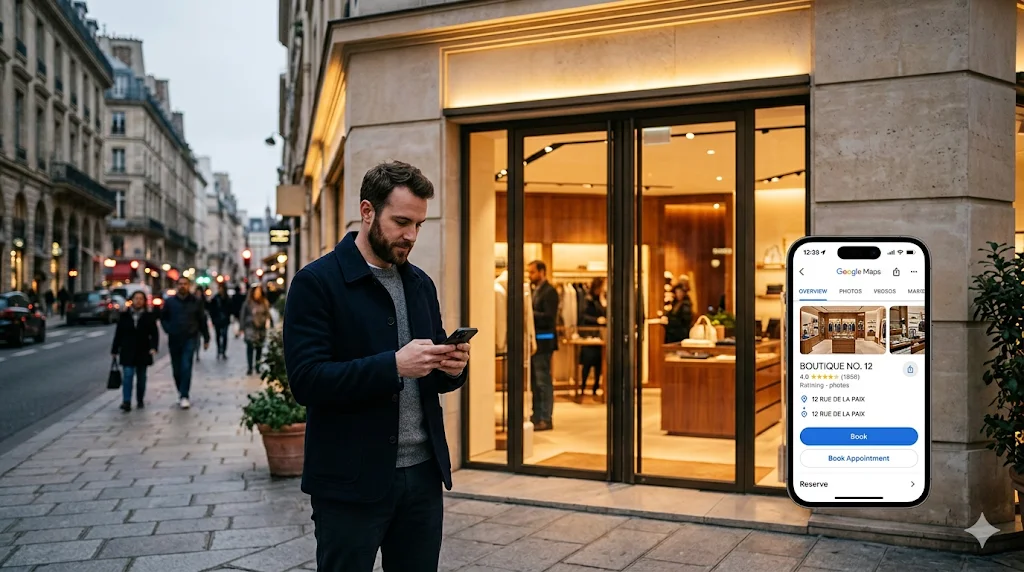

When a shopper searches for a beauty appointment near them and sees a "Book Online" button next to your store listing on Google, they don't complete that booking inside Google. They click the button and get redirected to your scheduling widget. That redirect is Reserve with Google.
Understanding exactly how it works, and whether your business qualifies, is the prerequisite for every setup decision that follows.
Reserve with Google is a feature that places a booking action directly on a Google Business Profile. When activated, a "Book Online" button appears under the store name in Google Search and Google Maps results, giving customers a direct path from search intent to a scheduled appointment.
What it is not: a native Google booking system. The button does not open a booking flow inside Google. It redirects the customer to the retailer's own scheduling page.
This distinction matters more than it first appears, and it's the one most guides on this topic get wrong.
Google operates two technically different booking integrations, and they are not the same product.
The End-to-End (E2E) integration allows users to select a time and confirm a booking entirely within Google, without leaving the platform. This model is primarily used by restaurants, through the Actions Center Dining integration. The booking data flows back to the partner's system in real time, but the customer experience never leaves Google.
The Redirect model, also called the Business Link integration, works differently. The "Book Online" button redirects the customer to the retailer's scheduling widget, hosted on the retailer's domain or within their scheduling platform. The customer completes the booking there. Google's role ends at the click.
For retail, the redirect model is the applicable path. This means the retailer controls the booking experience, the data flows into their own stack, and the CRM is updated through their scheduling platform. The Google listing is the discovery surface. The booking infrastructure is owned by the retailer.
The customer experience is straightforward. A shopper searches "eyewear fitting near me" or "beauty consultation downtown" on Google. A store listing appears. Underneath the business name and hours, a "Book Online" button is visible. The customer clicks it and lands on the brand's booking page, preloaded with the relevant service. They select a time, confirm their details, and receive a confirmation by email or SMS.
From the customer's perspective, the transition feels native to Google at the discovery moment. The redirect happens quickly and the booking page is branded. What the customer doesn't see is the scheduling infrastructure behind it: the platform managing availability, the listing management partner that connected it to Google, and the CRM updating in the background.
This is the section that most Reserve with Google guides skip, or get wrong.
Most retailers who start researching Reserve with Google ask "how do I set it up?" before asking "can my business actually use it?" Eligibility is the question that should come first. Setting up a scheduling platform and a listing management partner before confirming vertical and service eligibility wastes time and budget.
One widely cited claim in the scheduling software category states that "retail businesses cannot enable Reserve with Google." This is technically true for the End-to-End integration, which is designed for restaurants. It is not true for the redirect model, which is the path available to retail. The nuance matters.
Based on Google's published vertical policies and activation data from retailers working with listing management partners Yext and Partoo, three retail verticals have confirmed eligibility under the redirect model:
Beauty and skincare. Consultation appointments, makeup sessions, skincare diagnostics. Services must be paid and bookable as standard appointments with defined time slots.
Petcare. Grooming appointments, nutrition consultations, wellness check-ins. The service must be a scheduled, paid interaction, not an open floor visit.
Eyewear and optics. Frame fittings, lens consultations, optician appointments. The constraint that makes this vertical work is the same one that makes scheduling valuable: the specialist's time is limited and the service is non-substitutable.
These verticals are confirmed through both Google's policy documentation and live activations through compatible scheduling and listing management partners.
For luxury, fashion, and department stores, eligibility depends on the service offered rather than the vertical itself. This does not mean these sectors are excluded. It means that as of this writing, no public documentation confirms their eligibility, and any activation would depend on Google's review of the specific services submitted.
A luxury retailer offering a paid, bookable personal shopping session with a defined time slot and no custom fields may qualify under a general service category. A department store offering general browsing time will not. The distinction is in the service type, not the brand, and Google's approval is required regardless of vertical. If your sector is not among the confirmed verticals, contact our team to assess what is activable for your specific services, based on the latest field signals we have.
Google publishes explicit restrictions on the types of services that cannot be booked through the platform. Pulled directly from the Actions Center platform policies.
Services that are membership-based or subscription-based are not supported. Services that require insurance, waivers, or custom fields to complete the booking are not supported. Services that take extensive upfront data collection from the user are not supported. Free consultations and general store visits do not qualify as bookable services.
The service must be a standard, paid appointment: a defined time slot, a defined service, bookable without additional steps beyond standard contact information.
The paid-service requirement is worth flagging: Google's documentation remains ambiguous on whether free (zero-cost) services can be submitted through the appointment feed. Until that ambiguity is resolved, the safe activation path treats Reserve with Google as a paid-service channel only. A retailer building its activation around free consultations risks a compliance gap that may not surface until Google reviews the feed.
Every existing guide on Reserve with Google is written for a single-location SMB. The setup instructions assume one store, one Google Business Profile (GBP), one service menu. For a 30-store beauty chain or a 25-location petcare network, the architecture is different in ways that matter.
Three layers make Reserve with Google function for a multi-location retail network.
Layer 1: The scheduling platform. This is the system that manages appointment types, availability by location, staff assignment, confirmation flows, and reminder cadences. It is the operational core. The scheduling platform must be a certified Google partner or integrate with a listing management partner that is. Retailers typically activate Reserve with Google through a scheduling platform (like Booxi) connected to a listing management partner (like Yext or Partoo). The scheduling platform is where the retailer's booking infrastructure lives. The listing management partner is what connects it to Google.
Layer 2: The feed submission to Google. Google does not accept feeds from individual retailers directly. The merchant feed (services, availability, location data) must reach Google's Actions Center through a certified partner. Retailers have two paths here. If they already work with a listing management partner like Yext or Partoo, that partner submits the feed. If they don't, the scheduling platform itself can act as the certified partner and submit the feed directly. Booxi, for example, can serve as the RWG partner for retailers without a separate listing management solution, which removes the need for an additional contract and consolidates the activation into a single platform. Either way, this layer is what connects the scheduling infrastructure to the Google surface.
Layer 3: The Google Business Profile layer. Every store location in the network requires its own validated, verified Google Business Profile. The address must match Google Maps exactly. The business category must be aligned with an eligible vertical. Without a verified GBP per location, the Book Online button cannot appear for that location, regardless of what the scheduling platform and listing management partner have configured.
For multi-location retailers managing appointment scheduling across a network, this architecture is the foundation. Each layer has dependencies on the others, and a gap at any layer prevents activation.
Activating Reserve with Google for a single location is a configuration task. Activating it across 25 or 40 locations is an infrastructure project.
Every store needs its own validated GBP with consistent address data. The scheduling platform must support multi-location configuration: distinct service menus per location, location-level availability, and staff routing that the listing management partner can read and submit accurately. The listing management partner submits feeds for all locations simultaneously and manages matching between the merchant data and Google Maps locations.
Without centralized scheduling infrastructure, each location effectively runs independently. The Book Online button may activate at some locations and not others. Booking data doesn't consolidate at the network level. There is no way to see which locations are converting and which aren't.
The integration architecture between a scheduling platform and the retail stack is what makes network-level activation coherent rather than a patchwork of location-by-location configurations.
Check the business's primary vertical and service types against Google's published vertical policies in the Actions Center documentation. Confirm that the services being offered are paid, bookable with a standard time slot, and require no waivers, custom fields, or additional steps beyond standard contact information.
This step happens before any platform selection or partner engagement. Discovering a disqualifying service type after a scheduling platform has been deployed and a listing management contract has been signed is an avoidable outcome.
Every store location in the network needs a verified Google Business Profile with an address that matches Google Maps exactly. The business category must be aligned with an eligible vertical.
Unverified profiles will not activate regardless of what is configured downstream. For networks with inconsistent GBP data (mismatched addresses, duplicate listings, unverified locations), this step often requires a dedicated audit before Reserve with Google activation can begin. It is worth running this audit in parallel with platform and partner selection rather than sequentially.
The scheduling platform must work with a listing management partner that is a certified Google partner. For retailers already using a scheduling platform, the question is whether their current platform integrates with Yext or Partoo. For retailers selecting a new platform, compatibility with one of these partners is the relevant criterion.
For retail networks evaluating their appointment scheduling infrastructure, this is also the moment to assess whether the platform supports multi-location configuration, location-level service menus, and the data structure that listing management partners require for accurate feed submission.
Once the scheduling platform is in place, the merchant feed (business names, addresses, services, and availability) is submitted to Google's Actions Center through the certified partner, which also manages the match between the merchant data and the corresponding Google Maps locations. As covered in the architecture above, this is either a listing management partner like Yext or Partoo, or the scheduling platform submitting directly when it is certified.
This step involves a questionnaire covering the network's services and locations, which Google reviews as part of the approval process. The listing management partner handles the submission. The retailer provides accurate data for every location.
Google reviews the submitted feed, validates the merchant-to-GBP match for each location, and activates the Book Online button when the match is confirmed. The timeline from feed submission to button activation varies by provider, typically ranging from a few days to about two weeks once all requirements are in place. The button appears per location as each match is confirmed, not necessarily for all locations simultaneously.
Once active, booking volume from Reserve with Google appears in the scheduling platform's reporting and in the GBP dashboard. For multi-location retailers, monitoring which locations are producing bookings and which are not is the operational follow-through that the setup step doesn't cover.
Listing inconsistencies (a GBP address update, a category change, a duplicate listing resolution) can deactivate the button at a specific location without notice. Regular audits of GBP data across the network prevent silent deactivations from eroding the channel's contribution.
Reserve with Google does not create new demand. It captures demand that already exists at the moment it peaks: when a customer is actively searching for the service.
A customer who searches for a nearby service is typically in active purchase mode: they have named what they want and are reviewing their options in real time.
For customers who discover a store through Google, the presence of a complete, verified Google Business Profile with an active booking button compresses the conversion path. The customer identifies the service they want, sees that this location offers it, and books in a single session. Without the button, that same customer navigates away, searches for the brand's website, and either finds the booking page or abandons the intent entirely. The booking moment is captured at search or it is likely lost.
Early data from retail brands activating Reserve with Google with Booxi shows a 30% average increase in booking conversion from Google Business Profiles, with results ranging from +20% to +40% depending on market and vertical.
These are observed results from retail network activations, not modeled projections. The variation across markets reflects differences in search density, vertical competition, and GBP completeness at the time of activation. Retailers with fully optimized, verified profiles across all locations tend to see results toward the higher end of the range.
For the full picture of why booking-enabled listings convert, from organic CTR decline to the review loop, see our article on Google Business Profile bookings for retail networks.
Reserve with Google doesn't change the appointment. It changes when and where the customer decides to book it.
A customer who finds your store on Google and sees a Book Online button makes that decision at the moment of search, before they've navigated to the website, before they've had to think about it, before a competing listing has caught their attention. The retailers who activate Reserve with Google in eligible verticals are capturing that moment. The ones who haven't are still waiting for those customers to convert somewhere further down the funnel.
See how Booxi powers Reserve with Google activation for multi-location retail networks.
No. Eligibility depends on vertical and service type. Confirmed eligible verticals for retail include beauty, petcare, and eyewear. Luxury, fashion, and general department stores are not confirmed eligible under current published Google policy, though paid, bookable service appointments in those contexts may qualify pending Google review. Services must be paid, standard appointments with defined time slots and no additional booking steps. Free consultations, events, and membership-based offerings do not qualify.
Not for retail. The redirect model applies to retail verticals. When a customer clicks the "Book Online" button on a retail store's Google listing, they are redirected to the retailer's scheduling widget. The booking is completed there, not inside Google. Only the End-to-End (E2E) model, primarily used by restaurants, enables native booking within Google without a redirect.
Three requirements must be in place: a verified Google Business Profile per location with an address matching Google Maps exactly, a compatible scheduling platform that works with a certified listing management partner, and a certified partner to submit the merchant feed to Google's Actions Center. This can be a listing management partner like Yext or Partoo, or the scheduling platform itself when it is certified (Booxi can submit directly for retailers without a separate listing management solution). Google does not accept direct feeds from individual retailers. All three layers must be operational before the Book Online button can appear.
It depends on the service, not the vertical. A luxury retailer offering a paid, bookable personal shopping appointment with a defined time slot and no custom fields may qualify for Google's review under a general service category. As of today, no published Google documentation lists luxury as an eligible vertical: the exact status is "under review on Google's side." If you operate in a sector that is not yet confirmed, contact our team: we assess your specific case against the latest field signals and guide you on what is activable.
The timeline depends on the number of locations, the consistency of existing GBP data, and Google's review queue. Once all prerequisites are in place, button appearance typically ranges from a few days to about two weeks depending on the provider. For networks with incomplete or inconsistent GBP data, the audit and correction phase before feed submission can add significant time. Activating 40 locations simultaneously takes longer than 5, but the process runs in parallel rather than sequentially per location.
More To Explore

How Google Business Profile Bookings Convert Local Search Intent for Retail Networks

Best Retail Queue Management Software In 2026

Appointment Scheduling: What It Is and How It Works?